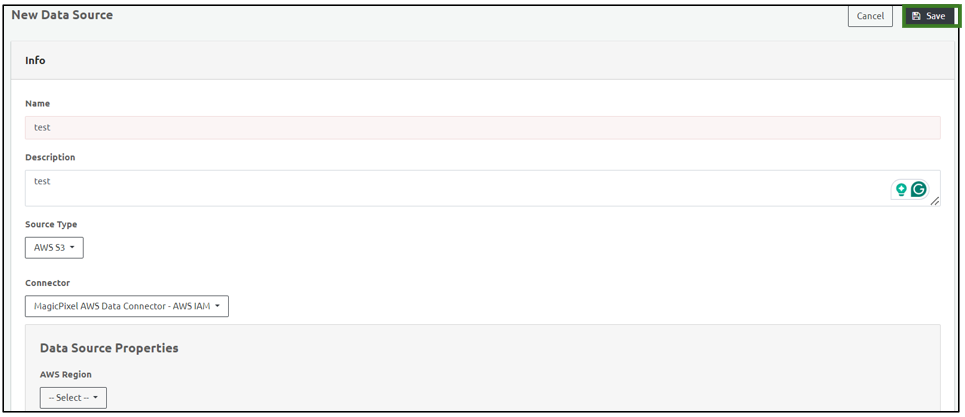
Add a Data Source
To add a new Data Source in Ingest Labs, perform the following steps:
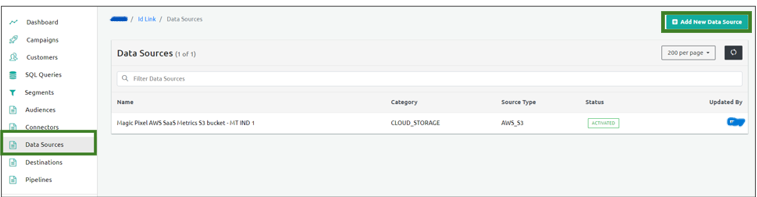
From the left navigation panel, select Data Sources.
Select Add New Data Source on the top-right corner of the screen.
Enter the name of the Data Source in the Name field in the Info section.
Enter the Description of the Data Source.
Select one of the following source types from the Source Type Dropdown menu:
- AWS S3
- SFTP
- POSTGRES
Select the Connector from the Connector dropdown menu.
Select one of the following data formats:
- Select the Delimited format and specify the header.
- Select the JSON format.
Select the following file format :
a. From the Compression Type dropdown menu, select the type of compressed file for the data source.
b. From the Content Encoding dropdown menu, select the encoding for the file.
c. From the Encryption Type dropdown menu, select encryption for encrypted data.Click Save to save the data source details.